
FlexiSip features
| Serial | Module | Feature | Transport | Description |
|---|---|---|---|---|
| 1 | FlexiSip | Transport | Websocket, Secured Websocket, tcp, udp, sctp and tls | You can format,send and receive SIP data over websocket, secured websocket, tcp, udp, sctp and tls. |
| 2 | FlexiSip | G711 | rtp over udp
rtp over dtls srtp over udp srtp-dtls | Audio codec G711 (both a-law and u-law) are supported. Various transport mechanisms supported are listed here. Any customization required will be supported. |
| 3 | FlexiSip | OPUS | rtp over udp
rtp over dtls srtp over udp srtp-dtls | OPUS is a multi-bit rate codec and one of the most preferred audio codec for WebRTC. OPUS is supported and various transports supported are listed here. During call you can capture audio file (with certain configurations) and can playback (if opus libs are present in your machine). |
| 4 | FlexiSip | AMR | rtp over udp
rtp over dtls srtp over udp srtp-dtls | AMR-NB (audio codec) is supported in multiplier. You can capture AMR data during call and playback with any generic media player. Various transports supported are listed here in transport column. |
| 5 | FlexiSip | VP8 | rtp over udp
rtp over dtls srtp over udp srtp-dtls | VP8 video codec is supported in multiplier. Any webm source having VP8 frames can be used during call. Other end you can capture and playback. For video playback you can make use of avplay or ffplay or otherwise a chrome browser. Various transports supported are listed here in transport column. |
| 6 | FlexiSip | H264 | rtp over udp
rtp over dtls srtp over udp srtp-dtls | H264 video codec is supported in multiplier. Any webm source having H264 frames can be used during call. Other end you can capture and playback. For video playback you can make use of avplay or ffplay or otherwise a chrome browser. Various transports supported are listed here in transport column. |
| 7 | FlexiSip | Front End Interface | N/A | Load Multiplier supports both Web interface and GUI interface. You can choose any one interface depending on your usage and requirement. This is supported for all plugins such as SIP, HTTP and JSON. |
| 8 | FlexiSip | Templates | N/A | Define your own template for SIP messages. Make use of these templates to format the SIP message. |
| 9 | FlexiSip | Extract | N/A | Extract any token (leaf node) from a SIP message. Store it into system with a unique key name. Later you can make use of this stored variable. |
| 10 | FlexiSip | Import | N/A | Get access to previously stored variable and use it to prepare any new SIP message. In a typical call flow, user can extract value from incoming message, use it anytime later during SIP call execution. |
| 11 | FlexiSip | API | N/A | You can invoke select APIs from user plane to control SIP call execution. You may like to call APIs for
|
WebRTC Load Testing
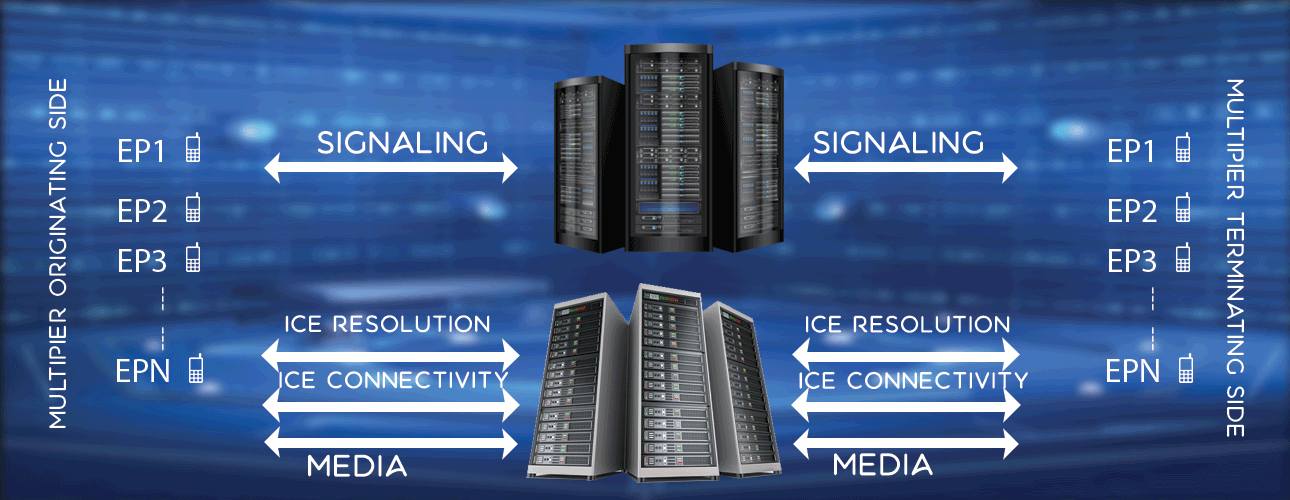
Features
Signalling SIP, IMS, JSON, HTTP
Media PCMA, PCMU, AMR, OPUS, VP8
Security TLS, SRTP/DTLS, Websocket
Features , Syntax , Example
Performance, Capability
Machine Desktop 2.4 GHz, 8 GB RAM
Memory/Endpoint 12Kb
Rating 1 100,000 endpoints, 15 CPS, 15 sec call
Rating 2 3600 endpoints, 120 CPS, 15 sec call
Cost, Packages
Check cost, packages here.